
Product story
Syncing an Obsidian folder with Nextcloud
The design for reliable two-way Nextcloud folder sync keeps Markdown notes visible to Obsidian, preserves conflicting edits, and avoids hidden app folders.
Published · Updated · 5 minute read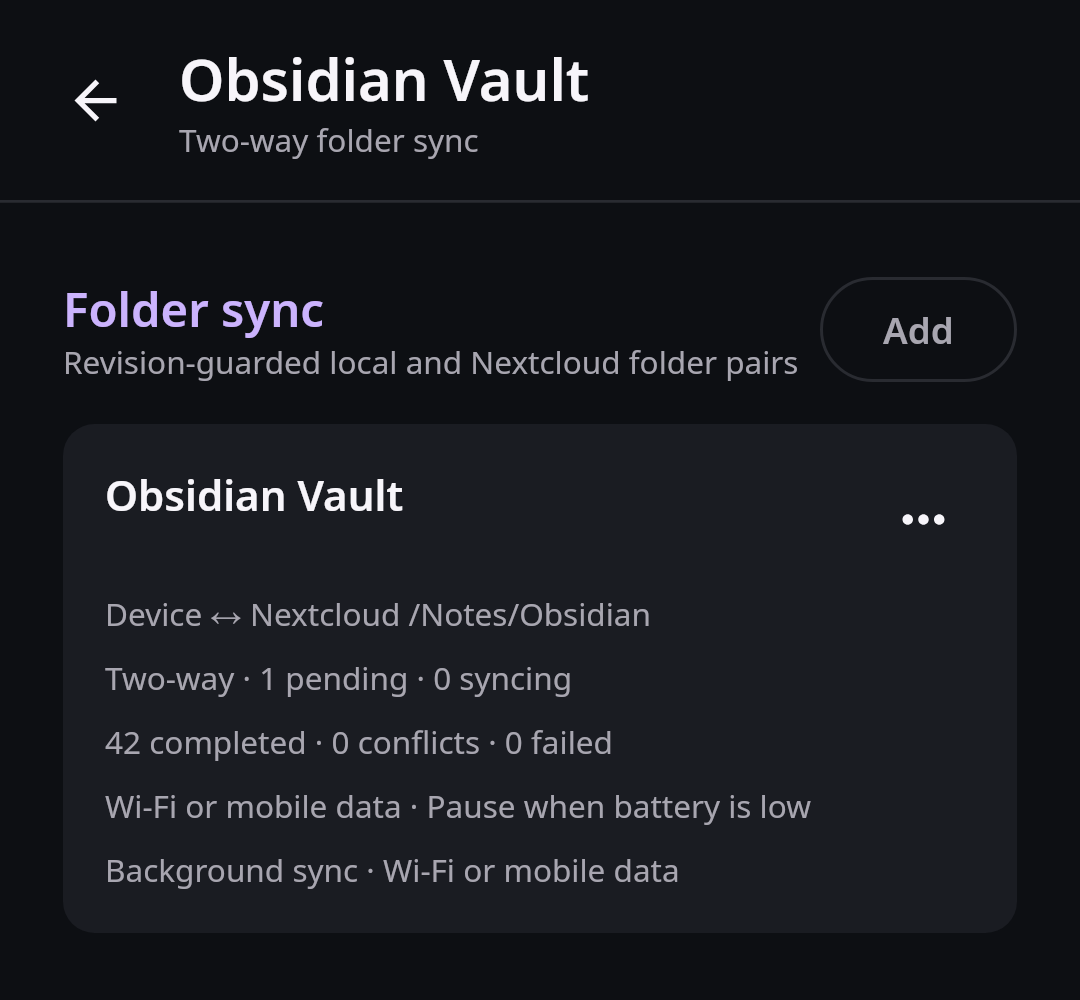
Many people keep years of writing in an Obsidian vault: Markdown notes, attachments, canvases, and small configuration files that are valuable precisely because they are ordinary files. They want the same folder on phone and computer without paying for a second cloud or giving another service a copy of their notes.
Nextcloud can store that folder, but storage alone is not a dependable mobile sync experience. A useful client has to notice changes on both sides, work in the background, survive restarts, explain conflicts, and leave the local files where Obsidian and other Android apps can still see them.
A vault needs more than storage
Putting a vault inside an app-private directory makes access easy for the sync client and difficult for everything else. Obsidian cannot treat that private directory as a normal vault. Moving media into a hidden folder causes the same problem for social and editing apps.
A simple periodic download is not enough either. If a note changes on the phone and desktop between scans, a last-writer-wins copy can silently destroy one version. Large queues stored only in memory disappear after a crash. A screen with hundreds or thousands of transfer cards can itself become the reason the app slows down or stops.
The design therefore treats folder access, durable transfer state, conflict safety, and scalable history as one feature.
Four parts of dependable folder sync
The sync direction now separates four responsibilities:
- Android’s system folder picker grants access to a normal user-visible directory.
- A native Nextcloud destination picker selects a server folder without asking for an internal path or identifier.
- A durable coordinator records discovered changes, expected revisions, attempts, and results.
- The transfer screen queries small pages of pending, failed, and completed work instead of composing the entire history at once.
Suggested folders such as an Obsidian vault are selectable directly. The app uses Android’s system folder permission instead of opening an unrelated file browser and making the user find the same folder a second time.
Pairing a vault from start to finish
You open My stuff, choose Add folder sync, and select the existing Obsidian vault
with Android’s own folder picker. Next, you browse your Nextcloud folders and choose
Notes/Obsidian as the destination. The app previews representative files from the
local folder, shows the account that will receive them, and explains the difference
between upload-only, download-only, and two-way sync.
After you confirm two-way sync, the first scan creates durable work items. A compact status area shows how many notes are waiting, transferring, complete, or need attention. The detailed history loads in pages, so ten thousand successful files do not become ten thousand live UI cards.
Later, you edit the same note on your laptop while the phone has an offline edit. When both reconnect, the app sees that neither side still matches the revision recorded at the previous successful sync. It preserves both versions, marks one conflict, and offers a clear choice instead of silently choosing a winner.
Files stay visible to other Android apps
The local folder remains a normal Android document tree. Obsidian can open it, a Markdown editor can share a note, and the system file picker can expose an attachment to another app. Nextcloud Native stores sync metadata in its database, not as noisy control files mixed into the vault.
Android still controls the folder permission. If access is revoked, the app pauses the pair and explains how to reconnect it. It does not request broad storage access when a narrower system grant can safely cover the selected tree.
Safe defaults for real Obsidian vaults
Obsidian creates app-specific files and plugins with behavior that differs between devices. Sync rules make exclusions visible and handle renames, deletes, case differences, rapid edit bursts, and large nested vaults deliberately. Network, charging, and battery preferences stay attached to each folder pair instead of hiding inside one global switch.
Multiple Nextcloud accounts are part of every pair and transfer record. A personal vault and a work server are never mixed by an implicit global setting. Revoked Android folder access pauses only the affected pair and gives a direct path to reconnect it.
From background execution to conflict review
The synchronization design connects native local and remote pickers to durable SQLite state. It includes a folder preview before pairing, bounded pending, failed, and completed views, scheduled background execution, per-pair network and charging preferences, and a conflict review center that keeps both versions available. These data-safety gates remain active implementation work and are tracked in the public roadmap below.
Revisions make retries safe
Each observed local and remote item needs a stable relative path plus revision evidence appropriate to that side, such as size, modification data, content identity, or a server ETag. A planned transfer records the revisions it expects. Before committing a write or delete, the worker checks that the relevant revision has not changed.
Queue entries and verification records are specified for SQLite rather than a large JSON file. That model supports indexed paging, transactions, restart recovery, and bounded queries. Workers claim idempotent jobs so retrying after process death does not duplicate a successful upload. The UI observes summaries and pages from that durable source instead of owning the work itself.
Delivery roadmapFiles and folder sync0.2 Safe sync and media In progress View linked issues
Looking for concise version-by-version changes? Read the changelog.